Seafood and fish case planograms
A fishmonger case is closer to a display than a shelf. Whole fish and fillets sit on ice, trays are arranged by colour and species, and the shopper looks down through curved glass. Most lightweight planogram tools can't render a fishmonger case with any fidelity. Planogrammer models the case and the product in 3D, so a seafood layout can be judged as a shopper will see it.
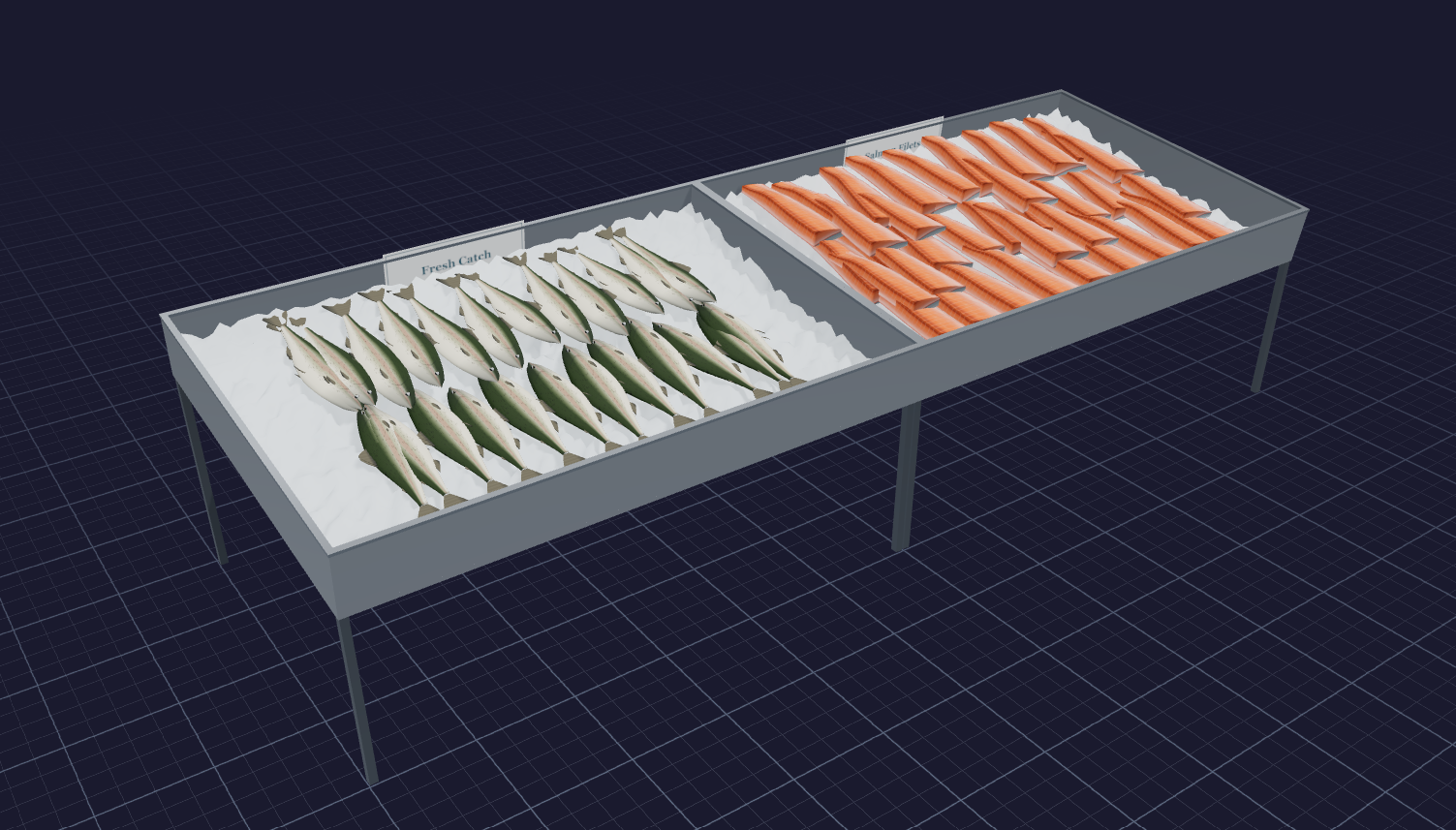
What makes seafood merchandising different
Seafood is sold on appearance. The display has to look fresh, generous and well kept, and much of that comes from ice, colour contrast and tray arrangement rather than from facings. The case is usually a refrigerated service counter with a sloped glass front, seen from above and at an angle.
Product shapes are irregular. A whole fish, a portioned fillet and a tray of shellfish take up space in completely different ways, and the same tray can look full or sparse depending on how items are laid out. There is also a working side to the case: staff need to reach every tray, and the layout has to support that.
What 3D adds to a seafood case
A schematic can say which tray holds which item. It cannot show whether a pale fillet disappears next to another pale fillet, or whether the rear trays are hidden by the glass curve from where a shopper stands. In 3D, the case, the ice bed and the product are all visible from the shopper's side of the glass.
That makes it possible to test colour sequence, tray sizes and signage placement before committing to a layout, and to show a buyer or a department manager a picture rather than a list.
What we deliver
For seafood cases we typically provide:
- 3D renders of the case from the shopper side and from above
- 2D layouts showing tray positions and item assignments
- An item list and set spec by tray
- Velocity overlays where you supply movement or sales data
The case itself is built to your dimensions, including the glass profile and deck depth, so the render reflects what shoppers can actually see.
Who uses seafood case planograms
Seafood suppliers use 3D case layouts to propose a feature or a new item and show how it would sit among existing product. Brokers use them to present a complete case plan across several suppliers. Retail seafood and fresh teams use them to standardise case layouts across stores, plan seasonal features and brief department staff with a clear picture.
A render is also a practical training tool: staff can see the intended layout rather than interpret a diagram.
Working with GOODS
Seafood case planograms are delivered by GOODS consultants as part of an engagement, not as self-serve software. Share the case dimensions, the item list and photos of the current display, and we build the case in 3D and send back renders and layouts for review.
Frequently asked questions
- Can you model a service case with curved glass?
- Yes. The case is built with its glass profile, so renders show what is visible from the shopper side.
- Do you render ice beds and trays?
- Yes. Ice, trays and product are part of the model, since they drive how the display looks.
- Can you show whole fish as well as fillets?
- Yes. Whole fish, fillets and other seafood items are modelled in 3D rather than drawn as flat shapes.
- Can the same layout be rolled out to several stores?
- Yes. A single case layout can be shared as renders and a spec so stores can set it the same way.
Related
Talk to us about a project
Planogrammer is delivered inside GOODS consulting engagements, not sold as self-serve software.
Talk to us about a project