Produce department planograms and bin layouts
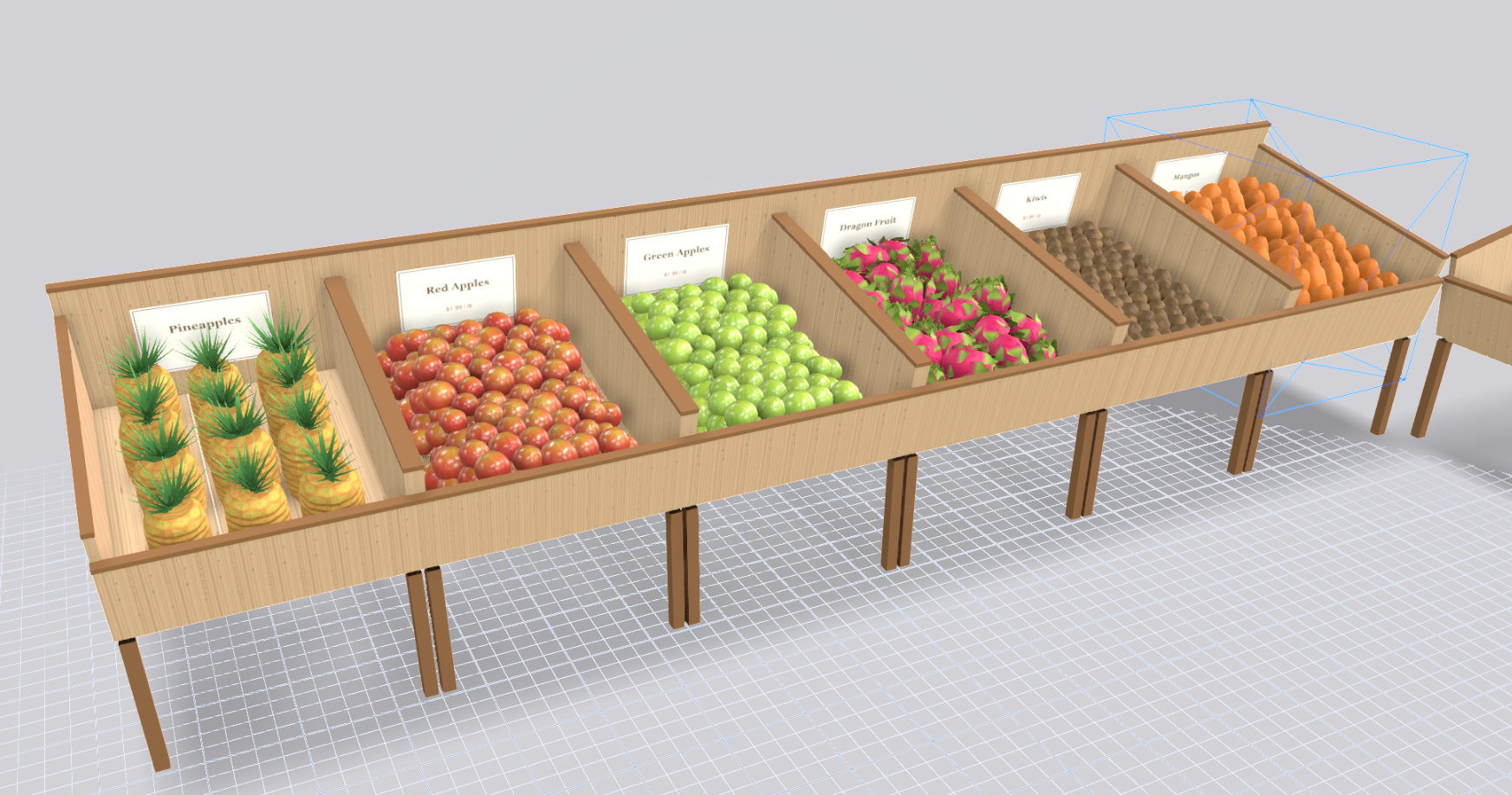
Most lightweight planogram tools can't render a produce bin with any fidelity. Produce isn't a row of boxes on a shelf. It is loose fruit piled in bins, bunches on wet racks, bags on hooks and bulk displays that change with the season. Planogrammer models produce items as three-dimensional objects and places them in real fixtures, so a produce layout can be reviewed as it will look on the floor.
What makes produce merchandising different
Produce is sold by abundance and colour. A well-stocked bin reads as fresh; a thin one reads as picked over. The fixtures are varied: angled bins, flat tables, refrigerated wet racks, island displays and baskets. Many are low and seen from above, which is the opposite of a gondola.
Items also vary in shape far more than in center store. Apples, pineapples, dragon fruit and leafy greens each take up space differently, and the same bin can hold very different quantities depending on what goes in it. Adjacency matters, too, both for colour contrast and for keeping items that need refrigeration in the right fixtures.
What 3D shows that a schematic can't
A schematic can only draw a produce bin as a labelled rectangle. That tells you which item goes where but not what the department will look like. In 3D you see loose fruit piled in the bin, the colour sequence across a table and how an island display looks as a shopper walks around it.
This makes it possible to judge colour breaks, sightlines across the department and the height of displays before anything is built. It also gives buyers and store teams a clear picture to react to, which is hard to achieve with a floor plan alone.
What we deliver
A produce engagement can include:
- 3D renders of the department and of individual fixtures
- 2D elevation images showing fixture positions and item placement
- An item list and reset spec by fixture
- Share-of-space and velocity overlays when movement data is supplied
Fixtures such as bins, tables and wet racks are built to the dimensions you give us, so the layout respects real clearances and aisle widths.
Who uses produce planograms
Produce brands and growers use 3D layouts to propose a display or a seasonal feature and show a buyer what it would look like in store. Brokers use them to present a department-level plan that includes several suppliers. Retail produce teams use them to plan resets, seasonal transitions and new fixture layouts, and to share one clear picture with store staff.
Because produce changes through the year, being able to swap items in the same fixtures and re-render is often more useful than a single fixed plan.
How to start
GOODS delivers produce planograms as part of consulting engagements. Tell us about the fixtures, the item mix and the season or event you are planning for, and we build the department in 3D. Photos of the current layout help us match the fixtures closely.
Frequently asked questions
- Can you render loose fruit and vegetables?
- Yes. Produce items are modelled in 3D and can be piled in bins and on tables rather than drawn as flat blocks.
- Which produce fixtures can you model?
- Bins, tables, wet racks, islands and baskets can all be built to your dimensions. Send photos or drawings of anything unusual.
- Can you plan a seasonal changeover?
- Yes. The same fixtures can be re-merchandised with a new item mix and re-rendered, so you can compare seasons side by side.
- Do you show velocity for produce?
- When you provide movement data we can overlay it on the layout. We do not show estimated velocity.
Related
Talk to us about a project
Planogrammer is delivered inside GOODS consulting engagements, not sold as self-serve software.
Talk to us about a project